
iPhone memory full? Create temporary extra space!



iPhone memory full and temporarily create extra memory by clearing apps?
Suppose you are going on vacation and have a long trip ahead of you, the perfect opportunity to download a movie via Netflix on your iPhone to pass the time. But there’s that irritating message again “iPhone memory full, download not possible…”. We all know it, in blind panic you quickly start deleting files from your iPhone but then realize that all data and documents in these apps are also immediately lost. There must be another way to do this, right? You can! Read on and learn how you can (temporarily) clear apps for extra storage and thus free up more storage space on your iPhone.
In this blog, we discuss:
- Automatically clean up and create more memory using iOS
- Clearing apps manually
- Putting back cleared apps
- Extra tip: check large attachments in messages and WhatsApp
- Freeing up extra storage without deleting apps
Automatically clean up and create more memory using iOS
iOS can give you a hand by keeping an eye on which apps are barely used and clearing them out automatically. All data and documents from the apps are saved in this process so that you can use them immediately when you need them again. Of course, you have to give your iPhone permission to do this first.
- Navigate to Settings
- Click on General
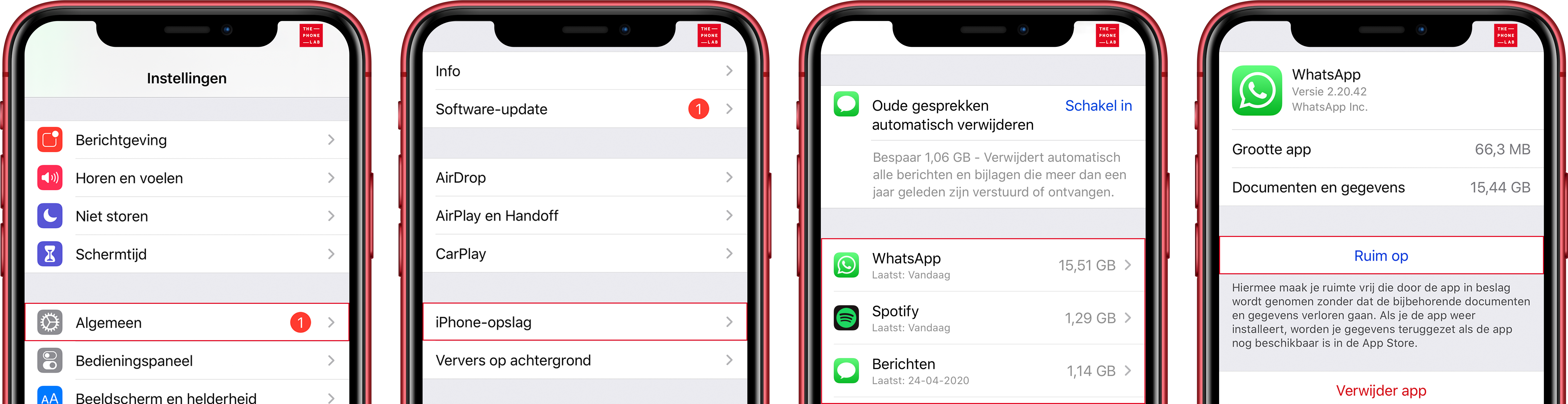
- Choose iPhone storage
- Enable the Clean up unused apps option
This feature is especially useful for people who regularly run low on storage, such as when taking photos or downloading media. iOS can now automatically suggest this when your storage is nearly full.
Clearing apps manually
Would you rather be in control of when your iPhone memory is full? Then you can also do this manually.
- Navigate to Settings.
- Click General.
- Choose iPhone storage.
- A list of all your apps will now appear, choose the app you want to clean up.
- Click on Ruim app op.
Note that this only deletes the app itself, not your personal data or documents within the app.
Putting back cleared apps
Your vacation is over, the movie is watched so you no longer need the extra storage space. Now you want to restore the apps you cleared for the extra storage space. As you may have noticed, the cleared apps remain on your home screen. You can recognize the cleared apps by the download cloud in front of the app icon. Tap the app to reload it. You can now use the app as usual.
Extra tip: check large attachments in messages and WhatsApp
A common forgotten cause of full storage are photos, videos and voice messages in apps such as Messages and WhatsApp. Through Settings > General > iPhone Storage > Messages you can view and delete large attachments without deleting the entire conversation. Also within WhatsApp, you can quickly clean up by chat or file type through Settings > Storage and Data > Manage Storage.
Thus, you often gain back tens to hundreds of MBs without touching important apps.
Freeing up extra storage without deleting apps
In addition to cleaning up apps, you can also gain storage space by deleting old iOS updates, clearing Safari’s cache via Settings > Safari > Delete history and website data, or by optimizing photos and videos through iCloud Photos. With this option, your original files remain safely stored in the cloud and your device takes up less space.
In addition, check regularly to see if your iPhone displays a storage view with recommendations. iOS often provides smart suggestions such as automatically deleting old downloads or clearing out large media files.
-
What takes up the most storage space on my iPhone?
Usually, these are photos and videos, followed by WhatsApp media, downloads from streaming services and large apps such as games. Through Settings > General > iPhone storage you can see exactly what takes up the largest space.
-
Does "Clear app" delete my data?
-
How do I quickly free up the most space on my iPhone?
Are you unable to get the uncluttered apps back? Or do you have another question?
We would love to help you in one of our stores! Make an appointment online or walk into our store.

