
Delete an app on your iPhone? In two simple steps!


Delete app on your iPhone? Here’s how to do it!
You probably know it, you’ve downloaded an app but use it little to nothing. So the app actually just takes up valuable space that you could put to good use for photos or another app you do like to use. So you’ve decided to uninstall this app, but how do you actually do that? In this blog “App removal on your iPhone” we explain it to you in detail.
We discuss:
- Uninstalling an app on iPhone? Two simple ways!
- Delete apps via settings
- Delete apps via Spotlight bonus (available in iOS 26)
- Recovering deleted apps, is that possible?
- Can I also temporarily delete my apps for extra storage?
- Why can’t I delete an app on my iPhone?
- Still suffering from a stubborn app that won’t let itself be removed?
Uninstalling an app on iPhone? Two simple ways!
Deleting apps from the home screen
This way will already be familiar to many people, and is therefore the easiest and fastest way. It goes as follows:
- Place your finger on the app you want to delete. Hold your finger on the app longer (not harder!) until a dropdown menu appears. Also, you can now slide your finger up so that the icons begin to wobble.
- From the dropdown menu, you can click directly on Delete app.
- Did you slide your finger up and the icons started wobbling? If so, crosses now appear in the upper left corner of the app icon.
- Tap the cross with your finger to delete the app.
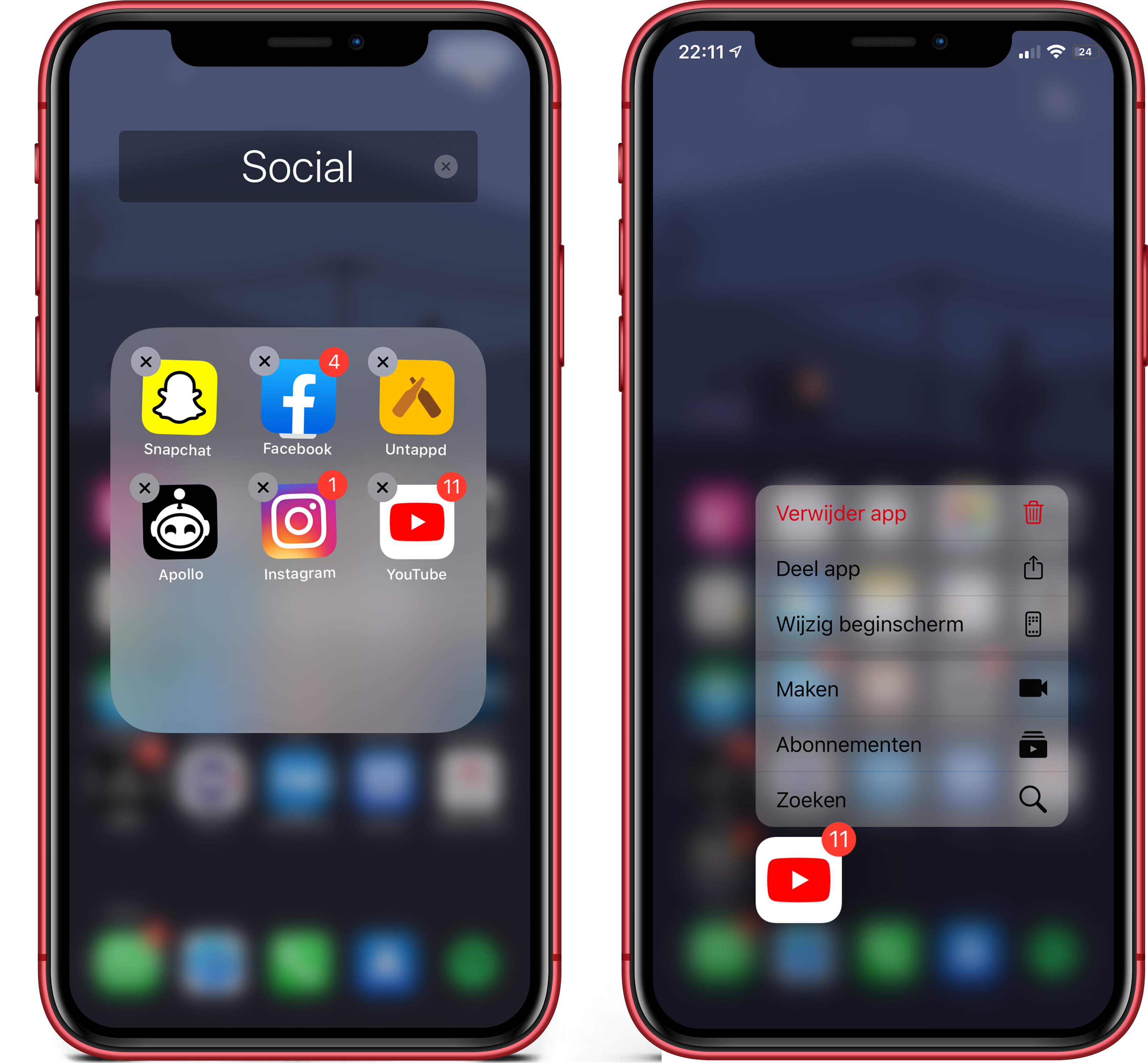
Want to delete more apps? Then repeat step 4. When you’re done deleting your apps, click the home button (or on an iPhone X or newer, swipe up from the bottom edge of the screen). The icons will now stop wobbling again.
Delete apps via settings
Another way to delete your apps is through your settings. This too is easy but a little slower than the above option.
- Navigate to Settings and choose General.
- Click on iPhone storage here.
- A long list of apps will now appear, click here on the app you want to delete.
- Now click Delete App and then click Delete App again

Delete apps via Spotlight bonus (available in iOS 26)
With iOS 26, you can now delete apps from Spotlight:
-
On your home screen, swipe down to open Spotlight.
-
Type the name of the app you want to delete.
-
Hold down the app icon for a moment in the search results.
-
Tap Delete app in the context menu and confirm.
This method is especially useful if you have many apps and don’t know exactly which page they are on.
Recovering deleted apps, is that possible?
No problem, you can easily find these apps again in the App Store. Apps that you have previously downloaded are recognized by the App Store. You can recognize these apps by the little cloud that appears where the download button is. Tap the cloud to download the app again, if it is a paid app you do not have to pay again.
Can I also temporarily delete my apps for extra storage?
You can! The downside of deleting apps is that all the data and documents stored in them are also immediately lost. Would you rather clean up your apps for temporary extra storage? Then read our blog on “How to free up iPhone storage“.
Why can’t I delete an app on my iPhone?
Sometimes an app cannot be uninstalled. This is often due to settings or security. For example, consider Screen Time, or a work phone with a management profile. In those cases, the Delete app option is not displayed.
Therefore, check if restrictions are active through Settings > Screen time > Content and privacy. It is also possible that an app is part of iOS itself and therefore cannot be completely uninstalled, but can only be removed from the home screen.
Do you use a work phone or school device? Then an administrator may determine which apps you can or cannot delete. In that case, you must have this modified by the device’s administrator.
Still suffering from a stubborn app that won’t let itself be removed?
We are happy to help you in one of our stores! Make an online appointment or walk into our store, just keep in mind with the latter that you may have to wait a while.
-
Why can't I delete an app from my iPhone?
This is often because of Screen Time, a management profile from work or school, or because it is a standard iOS app that you can only remove from the home screen.
-
What is the difference between deleting an app and removing an app from the home screen?
-
Can I recover a deleted app without paying again?
-
Why is my iPhone storage still taking up a lot of space after deleting apps?
-
How do I uninstall apps when my iPhone crashes or is slow?

